
Deleting a momentum strategy permanently stops the stategy from trading. This means
- No new orders will be placed or executed.
- Any existing active deployments (currently running) will be halted.
- Any queued or pending deployments (waiting to start) will be canceled and will not execute.
Important:
Deletion is irreversible — the strategy and its configuration will be removed from your account.
Before deleting, consider exporting it first, if you might want to reuse or reactivate the strategy later:
- Export the strategy to save a backup copy via Momentum Trades > Import/Export Strategies.
- You can re-import and deploy it anytime via Momentum Trades > Import/Export Strategies.
Recommendation:
Always export important strategies before deletion — it’s a simple safeguard that lets you restore them quickly without recreating everything from scratch.
Here are the steps to delete the strategy:
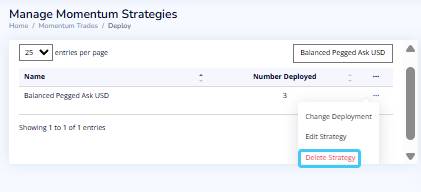
- Return to the Momentum Trades > Manage Strategies list.
- Find the strategy again (using search if necessary).
- Click the three dots (⋯) at the end of the row.
- Select Delete Strategy.
- Click the Continue button to delete the strategy.
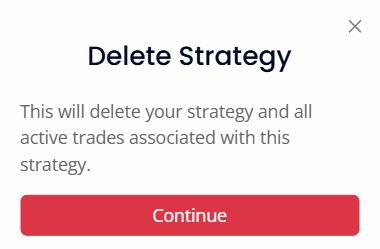
Once both steps are complete, the strategy is fully stopped and removed — no further orders will be placed or executed.