
To fully stop a Momentum Strategy from running and placing orders, you must complete both of these steps:
- Disable the strategy (by setting deployments to 0)
- Delete active deployments (to immediately stop all active deployments and any queued/pending ones)
Important: If you only delete the active deployments without disabling the strategy first, the strategy may continue to be deployed and could still execute orders. Always disable it (set deployments to 0) before deleting active deployments.
Step 1: Disable the Strategy
To disable the strategy, set the number of deployments to 0 (zero).
What are deployments?
When creating a Momentum Strategy in Idatco, you specify the number of deployments — this controls how many times (or how aggressively) the strategy can execute to complete its objective.
Once the first deployment completes, the second deployment can occur if needed, and so on — up to the maximum number set. For example, if you set deployments to 3, the strategy is allowed up to a maximum of 3 deployments to fully execute the trade sequence.
Each deployment triggers the algorithm to scan for momentum signals (using indicators like Funds Matrix, RSI, Bollinger Bands, MACD), analyze market conditions, and place orders on connected exchanges.
The first deployment is where the Idatco fee is deducted from your balance.
- Login to your Idatco account.
- Navigate to Momentum Trades > Manage Strategies in your platform dashboard.
- You will see a list of all your created strategies.
- Each strategy shows its name and the number of deployments currently active for it.
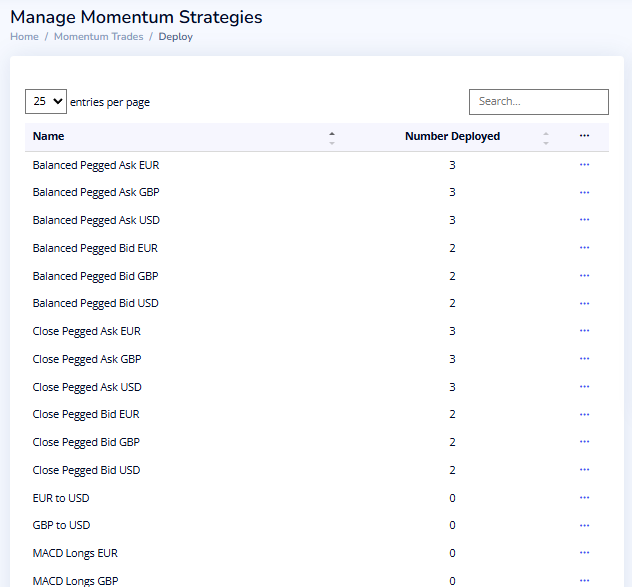
- Each strategy shows its name and the number of deployments currently active for it.
- Use the search field at the top to quickly find your strategy (e.g., type “Balanced Pegged Ask USD”).
- Locate your strategy in the list.
- Click the three dots (⋯) at the end of the row for that strategy.
- Select Change Deployment.
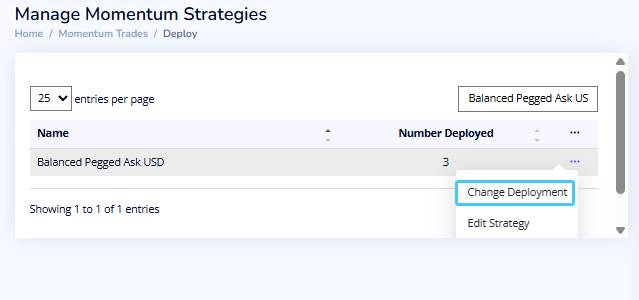
- In the deployment field, set the number of deployments to 0.
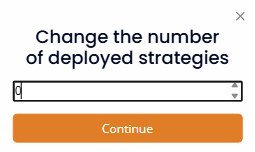
- Click the Continue button.
This stops any new deployments for this strategy from being placed.
Important Note on Remaining Deployments
If any deployments remain from the original number (or if active deployments are currently queued/waiting to execute), these will continue running and placing/executing orders until they complete or reach the originally configured limit — even after you disable the strategy.
You can view your active deployments here.
- To immediately stop these remaining/active deployments and prevent any further orders: Proceed to Step 2 below and fully delete active deployments.
- However, if you prefer to let these existing deployments finish naturally (e.g., to allow open positions to close or pending orders to complete), you can skip Step 2 — simply leave the strategy disabled without deleting the active deployments.
Recommendation:
Always review your open positions and pending orders on the connected exchange(s) after disabling and deleting active deployments to double check.
Why this matters
Disabling stops new deployments, but existing/queued ones are independent and will persist until fulfilled. Deletion of deployments ensures a full halt.
Step 2: Delete Active Deployments
Deleting active deployment means:
- Any existing active deployments (currently running) will be halted.
- Any queued or pending deployments (waiting to start) will be canceled and will not execute.
Here are the steps to delete the deployment(s):
- Navigate to Momentum Trades > Manage Deployments in your Idatco dashboard.
A list will appear showing all active, queued, or waiting deployments across your momentum strategies. - Locate the specific deployment(s) for your strategy:
- Use the search field at the top (type the strategy name, e.g., “Balanced Pegged Ask USD”) to filter the list quickly.
- In the row for the relevant deployment:
- Look at the button or status indicator at the far right of the row.
It may display as “Waiting”, “Normal”, “Queued”, or a similar label depending on its current state.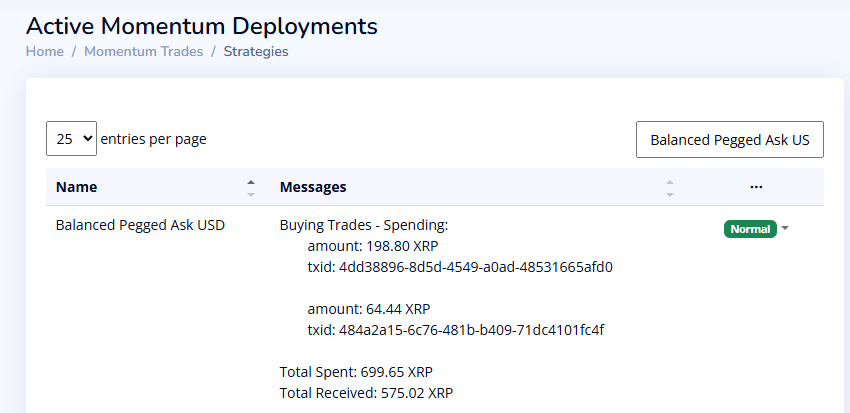
- Look at the button or status indicator at the far right of the row.
- A list will appear of all the active deployments for this strategy. Click the button in each row and select Delete Deployment.
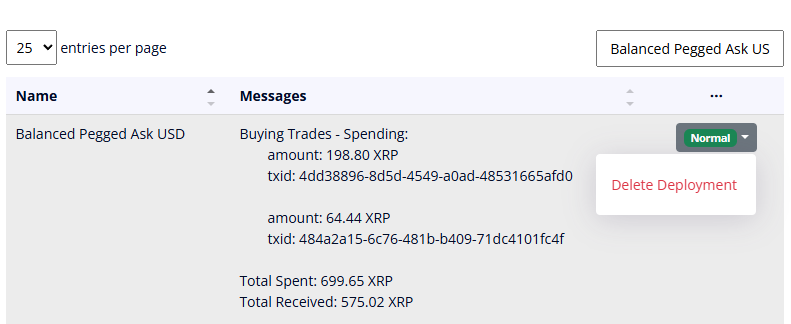
You can also click on the three dots (⋯) at the top of the table to delete all the deployments for this particular strategy.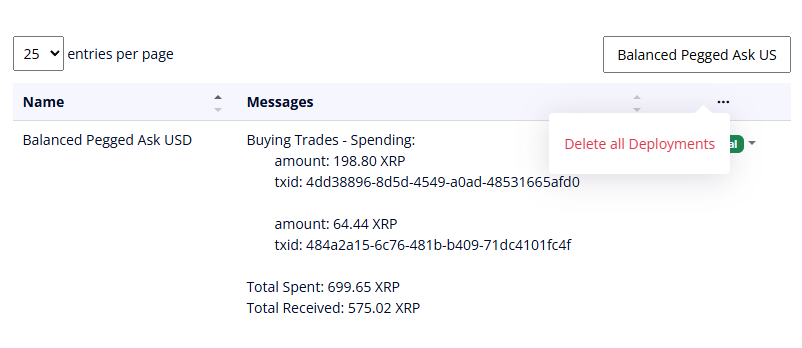
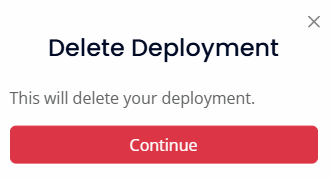
- Confirm the deletion by clicking the Continue button.
Key Effect:
This permanently cancels the selected deployment(s), preventing any further execution of orders associated with them — even if they were queued or waiting due to partial fills, liquidity, or scheduling.Important
Notes:
Repeat steps 2–4 for each remaining deployment tied to the strategy if multiple appear.
After deletion, refresh the list to confirm the deployment(s) no longer show.
Deleting deployments here does not affect the strategy configuration itself — it only stops active/queued instances.
Always double-check your connected exchange(s) afterward for any open or pending orders, as some may require manual cancellation on the exchange side.
Once both steps are complete, the strategy is fully stopped and no longer actively deploying — no further orders will be placed or executed.
Important Notes: Multiple Deployments Help Execute Momentum Strategies Effectively
In Idatco momentum strategies, deployments allow the algorithm to execute trades multiple times (or more aggressively) to achieve full order completion — especially on low-liquidity exchanges where a single large order might only partially fill.
- On exchanges with limited order book depth, attempting to trade a large amount at once can result in partial fills (only part of the order executes immediately).
- The unfilled portion sits on the order book, exposing it to market condition changes (e.g., price slippage, reversals, or worsening liquidity) while waiting for more matching volume.
- This increases the risk of incomplete execution or unfavorable fills.
How deployments solve this:
By setting a higher number of deployments (e.g., 2–4 instead of 1), traders can:
- Break the total trade size into smaller portions.
- Deploy them sequentially or in parallel based on momentum signals (using indicators like Funds Matrix, RSI, Bollinger Bands, MACD).
- Allow follow-up orders to “chase” remaining fills as liquidity becomes available, reducing slippage and increasing the chances of full execution.
Example:
If your strategy aims to buy/sell 1000 XRP but the exchange only has liquidity for 300 XRP at the target price:
- A single deployment might fill only 300 XRP and leave the rest pending.
- With 3 deployments, the strategy can place smaller initial orders (e.g., 300–400 XRP each), monitor for fills, and trigger additional ones as needed — often completing the full 1000 XRP faster and closer to the intended price.
Best Practice:
- Always start conservative and monitor performance via the strategy status/messages.
- Use lower deployments (e.g., 1–2) on high-liquidity exchanges (like major ones) for simpler, lower-fee execution.
- Use higher deployments (e.g., 3–4) on thinner markets to minimize partial-fill risks — but balance this against higher Idatco fee exposure (fees apply per deployment).